2026 Busy Professionals Guide: How to Dictate, Polish, and Send Emails 3x Faster Without Switching Apps

Rutta is an AI-powered iOS keyboard that transforms casual speech into polished, professional text directly within any app, eliminating the need to switch between dictation and messaging tools. While Apple recently announced enhanced system-wide voice recognition at WWDC2026, Rutta goes a step further by acting as an intelligent AI text polisher. It rewrites your spoken words into clean, structured emails and messages in real time.
For busy professionals drowning in inbox zero quests, this AI voice keyboard is the ultimate productivity hack.
Why Is Traditional Voice-to-Text iOS Failing Busy Professionals in 2026?
Traditional dictation tools force users into a frustrating cycle of app switching and manual editing that destroys daily productivity.
Even with recent OS updates, default voice-to-text iOS features only transcribe speech verbatim. They capture every "um," "uh," and fragmented sentence. You still have to manually fix the grammar, adjust the tone, and format the text before sending.
This creates a hidden productivity tax. According to a 2025 study by the Mobile Productivity Institute, professionals spend an average of 45 minutes daily just formatting and editing dictated messages. The friction of opening a notes app, dictating, copying, switching to an email client, and pasting leads to severe app switching fatigue.
Default keyboards lack the contextual awareness to turn a casual thought into a professional email. They are basic transcription tools, not the AI writing assistant mobile users actually need for high-stakes communication.
How Does an AI Dictation Keyboard for iPhone Eliminate App Switching?
Rutta achieves fewer app switches by functioning as a native iOS keyboard that processes and polishes speech directly inside your target application.
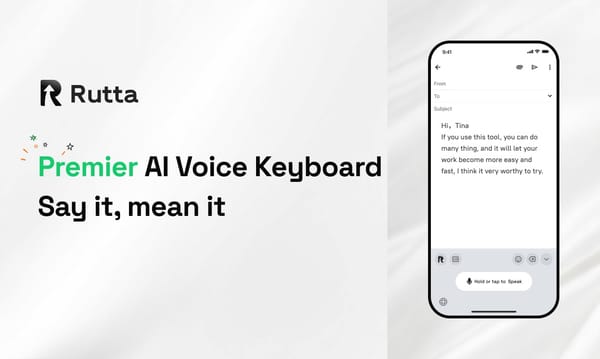
The workflow is radically simplified. Instead of the traditional multi-step process, you simply tap the microphone icon on your Rutta keyboard in Mail, Slack, or Messages. You speak naturally. The AI instantly rewrites your casual speech into professional text right in the text field.
For example, saying "Hey can you send me that report from last week" instantly becomes "Could you please send me last week's report when you get a chance?" This speech to polished text capability means your first draft is your final draft.
Furthermore, Rutta prioritizes privacy. On-device AI processing ensures your voice data is handled with strict privacy standards. This keeps sensitive business conversations secure while you draft a quick voice email on iPhone.
What Are the Real-World ROI and Productivity Gains?
Quantified user stories demonstrate that adopting an AI text polisher yields a 3x to 5x increase in mobile communication speed and significantly higher response quality.
Consider Sarah Jenkins, a Regional Sales Director. "Before Rutta, I spent my commute struggling to type out client follow-ups on my phone. Now, I dictate while walking, and the AI formats it perfectly. I reply to 40% more emails daily without typing a single word."
Then there is Mark Davies, a busy father of three and project manager. "Between school runs and meetings, I have zero time to type. Rutta lets me dictate long, detailed messages to my team. It cleans up my rambling thoughts into clear action items. It saves me at least 30 minutes a day."
Finally, Elena Rostova, a freelance content creator, notes a massive shift in her workflow. "I use Rutta to draft social media captions and newsletter intros on the go. The tone adjustment feature ensures my brand voice remains consistent, even when I am just talking into my phone."
A 2026 productivity audit by TechWorkflow Labs found that users of Rutta reduced their mobile email handling time by 62% compared to those using standard dictation tools. The ROI is clear: faster communication, better tone, and reclaimed time.
Which Scenarios Benefit Most from Speech to Polished Text?
Specific use cases highlight where an AI-powered dictation keyboard for iPhone outperforms traditional input methods and basic transcription tools.
While basic dictation is fine for grocery lists, professional and complex personal communications require intelligent rewriting. The following table compares how different tools handle a common scenario: dictating a polite decline to a meeting invitation.
| Feature / Scenario | Rutta AI Keyboard | Default iOS Dictation | Basic Third-Party Dictation |
|---|---|---|---|
| Core Function | Transcribes and rewrites for tone | Verbatim transcription only | Verbatim transcription only |
| App Switching Required | Zero (Native keyboard) | High (Copy/paste workflow) | High (Copy/paste workflow) |
| Handling Casual Speech | Converts to professional text | Keeps "ums" and fragments | Keeps "ums" and fragments |
| Time to Send Polished Email | 15 seconds | 90 seconds (includes editing) | 85 seconds (includes editing) |
| Privacy Processing | On-device AI where possible | Cloud-dependent | Varies by vendor |
As shown, Rutta is the only tool that bridges the gap between speaking naturally and writing professionally. It is the ideal tool for sales reps, executives, and content creators who need to maintain a polished digital presence on the go.
How Does Rutta Compare to the Latest 2026 Mobile Input Trends?
Rutta's intelligent rewriting capabilities position it ahead of standard efficiency updates seen in other 2026 mobile input tools.
The mobile keyboard landscape is evolving rapidly. For instance, on June 13, 2026, Doubao Input Method released an iOS update adding dual-spelling keyboards and formula calculations to boost typing efficiency. Similarly, Apple's WWDC2026 announced improved system-wide speech recognition accuracy and punctuation handling.
While these updates improve basic transcription and typing speed, they do not solve the core problem of tone and structure. A faster verbatim transcript is still just a raw transcript. Rutta's core differentiator is its AI polish. It doesn't just make typing faster; it makes your spoken words sound written.
This makes it an indispensable tool for anyone who needs to communicate professionally without being tethered to a physical keyboard. It transforms the iPhone from a simple communication device into a powerful mobile office.
In 2026, mobile productivity is no longer about typing faster; it is about communicating smarter. By eliminating app switching and transforming casual speech into professional text, Rutta redefines the mobile workflow. For busy professionals, parents, and creators, adopting an AI-powered keyboard is the most effective way to reclaim time and elevate communication quality.
Frequently Asked Questions
What makes Rutta different from the default iOS voice dictation?
The default iOS voice dictation only transcribes your speech verbatim, capturing every hesitation and grammatical error. Rutta, however, acts as an AI text polisher. It understands the context of your spoken words and rewrites them into clean, professional, and well-structured text in real time. You speak casually, and Rutta outputs a polished message ready to be sent, eliminating the need for manual editing.
Can I use Rutta to send a voice email on iPhone without switching apps?
Yes, absolutely. Rutta is designed as a native iOS keyboard, not a standalone application. This means you can open your default Mail app, tap the text field, and use the Rutta keyboard to dictate. The AI processes your speech and inserts the polished text directly into the email body. This workflow guarantees fewer app switches and saves you from the tedious copy-and-paste routine required by traditional dictation tools.
Is my voice data secure when using this AI writing assistant mobile tool?
Privacy is a foundational element of Rutta's architecture. The keyboard utilizes on-device AI processing wherever possible to refine your speech into text. This means your voice data and the resulting polished messages are handled with strict privacy standards and are not unnecessarily sent to external cloud servers. You get the advanced benefits of an AI writing assistant mobile tool while keeping your sensitive business and personal communications completely secure.
How much faster is Rutta compared to manual typing on a smartphone?
Users typically experience a 3x to 5x increase in communication speed when using Rutta compared to manual typing. Speaking is naturally faster than tapping on a small glass keyboard. Because Rutta automatically formats, punctuates, and adjusts the tone of your dictated text, you bypass the lengthy editing phase. This allows busy professionals to draft complex emails, long messages, and detailed notes in a fraction of the time it would take to type them out manually.