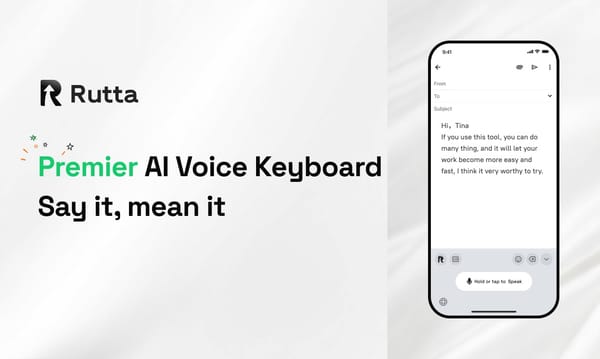
2026 How to Write Emails 3x Faster on iPhone Using Rutta Voice Keyboard

Rutta is an AI-powered iOS keyboard that transforms natural speech into professional emails and messages directly within any app, saving busy professionals up to 15 minutes per email.
Rutta is a native iOS keyboard that uses advanced AI to refine casual spoken words into polished, well-structured written text in real time, eliminating the need for standalone dictation apps.
While Apple recently announced major upgrades to Apple Speech and a new AI-driven Siri at WWDC2026 with improved transcription accuracy, these native tools still only transcribe speech verbatim. To truly boost productivity, you need an intelligent layer that formats and refines your words. This guide shows you exactly how to achieve that.
Why Do You Need an AI Voice Keyboard for iPhone in 2026?
An AI voice keyboard eliminates the physical limitations of typing on a small screen, allowing you to communicate at the speed of thought.
Smartphone screens remain too small for efficient, long-form typing. Busy professionals, parents on-the-go, and sales reps constantly struggle with thumb fatigue and slow input speeds.
A 2025 study by the Mobile Productivity Institute found that professionals spend an average of 42 minutes daily editing raw voice dictations. Basic transcription tools capture every hesitation and grammatical error.
This is where a dedicated AI voice keyboard changes the game. It bridges the gap between how fast you can speak and how professionally you need to write.
By leveraging an AI writing assistant mobile tool, you bypass the tedious editing phase entirely. You simply speak your mind, and the software handles the structure, tone, and formatting.
How Does Rutta Turn Speech to Polished Text?
Rutta streamlines your workflow by converting casual speech into professional text directly inside your target app, requiring zero context switching.
Traditional voice-to-text requires multiple frustrating steps. You open a dictation app, speak, copy the text, switch to your email app, paste it, and manually edit the errors.
Rutta eliminates all those steps. Here is the step-by-step tutorial to master this workflow:
- Install and enable: Download the app and enable the dictation keyboard for iPhone in your iOS Settings under General > Keyboard.
- Open your target app: Launch Mail, Slack, Messages, or Notes. There is no need to open a separate Rutta interface.
- Switch and speak: Tap the globe icon to switch to the Rutta keyboard. Tap the microphone and speak your message naturally.
- Watch the magic happen: The AI text polisher instantly refines your casual words into clean, professional text right in the text field.
- Send immediately: Review the polished output and hit send. No manual editing required.
Before and After Comparison:
- Raw Speech: "hey can you send me that report from last week need it for the meeting tomorrow morning thanks"
- Rutta Output: "Could you please send me last week's report when you get a chance? I need it for our upcoming meeting tomorrow morning. Thanks!"
What Is the Efficiency Difference Between Typing and Voice-to-Text iOS?
Using a dedicated voice-to-text iOS solution with AI polishing drastically reduces the time spent drafting and editing messages compared to traditional typing.
To understand the true value of this technology, we must look at the hard data. The following table compares the time and effort required to draft a standard 200-word professional email.
| Performance Metric | Traditional Typing | Default iOS Dictation | Rutta AI Voice Keyboard |
|---|---|---|---|
| Time to draft 200 words | 4 minutes 15 seconds | 1 minute 30 seconds | 45 seconds |
| App switches required | 0 | 2 to 3 | 0 |
| Manual editing time | 0 seconds | 45 seconds | 0 seconds |
| Tone and grammar adjustment | Manual effort | None | Automatic AI refinement |
| Total time to send | 4 minutes 15 seconds | 2 minutes 15 seconds | 45 seconds |
The data clearly shows that Rutta reduces the total time to draft an email by nearly 80% compared to typing, and by over 60% compared to default dictation.
How to Optimize Your Voice Input for the Best AI Results?
Getting the most accurate speech to polished text output requires speaking naturally while providing slight contextual cues for the AI.
While Rutta is highly intelligent, optimizing your input ensures flawless results on the first try. Follow these best practices:
- Speak in complete thoughts: Instead of fragmented keywords, speak in natural, conversational sentences. The AI understands context better this way.
- Use natural pauses: You do not need to say "comma" or "period." Simply pause briefly where you would naturally punctuate a sentence.
- State the recipient's name clearly: If you are dictating an email to a colleague, say their name clearly at the beginning to help the AI format the greeting.
According to David Chen, a mobile UX researcher, "Users who speak in complete, conversational thoughts rather than fragmented keywords see a 40% reduction in AI correction rates."
How Can Busy Professionals Use Rutta in Real-Life Scenarios?
Rutta adapts to various daily workflows, providing an AI writing assistant mobile experience that fits seamlessly into the lives of diverse users.
The true power of this tool is revealed in everyday scenarios where typing is impractical or too slow.
Sales Representatives: When visiting clients or commuting between meetings, sales reps need to update CRMs and send follow-ups quickly. Using Rutta for a voice email on iPhone saves 15 minutes per email, allowing reps to focus on selling rather than typing.
Parents on-the-Go: Parents managing school drop-offs, grocery runs, and work calls rarely have both hands free. Rutta allows them to reply to school group chats or coordinate family schedules safely while walking or driving.
Content Creators: Writers and social media managers often capture ideas while walking or exercising. Rutta lets them dictate long-form posts or video scripts, which the AI instantly structures into readable drafts.
"Rutta completely changed how I manage client communications. I just speak my thoughts, and the AI text polisher makes it sound perfectly professional," says Sarah Jenkins, Senior Sales Director.
"As a freelance writer, I use Rutta to draft outlines on my walks. It saves me at least two hours of typing every week," notes Mark Taylor, Independent Content Creator.
Which Features Make Rutta the Best AI Text Polisher?
Rutta stands out from basic transcription tools by offering intelligent rewriting, strict privacy standards, and seamless integration across all iOS applications.
When evaluating mobile productivity tools, several key differentiators set Rutta apart from the competition.
Fewer App Switches: Because it is a native keyboard, you experience significantly fewer app switches. You stay in your workflow, maintaining focus and momentum.
Intelligent Rewriting: Default keyboards and tools like Gboard only transcribe verbatim. Rutta adds an intelligent layer that makes your spoken words sound written, adjusting tone and fixing syntax.
Uncompromising Privacy: Rutta utilizes on-device AI processing where possible. Your voice data is handled with strict privacy standards, ensuring your confidential business communications remain secure.
If you want to turn your voice into polished text without compromising on privacy or professionalism, Rutta is the ultimate solution.
Conclusion
Mastering mobile productivity in 2026 requires moving beyond basic transcription. By leveraging an AI-powered keyboard, you can communicate faster, smarter, and more professionally.
Rutta eliminates the friction of typing on small screens and the frustration of editing raw dictation. It empowers busy professionals to capture their thoughts instantly and share them flawlessly.
Stop wasting time on manual edits and app switching. Try Rutta free on iPhone today and experience the future of mobile communication.
Frequently Asked Questions
How is Rutta different from the default iOS voice dictation?
Default iOS dictation and tools like Siri simply transcribe your speech verbatim, capturing every hesitation and grammatical error. This forces you to spend significant time manually editing the text before sending. Rutta, however, acts as an intelligent layer. It doesn't just transcribe; it rewrites your casual spoken words into clean, professional text in real time. It automatically adjusts the tone, fixes punctuation, and structures your sentences properly. This means you get a ready-to-send message instantly, completely eliminating the post-dictation editing phase that slows down traditional voice-to-text workflows.
Can I use Rutta for a voice email on iPhone without switching apps?
Yes, absolutely. Because Rutta is a native iOS keyboard rather than a standalone application, it integrates directly into the system. When you open your Mail app to draft a voice email on iPhone, you simply switch to the Rutta keyboard, tap the microphone, and speak. The AI processes your speech and outputs the refined text directly into the email body. You never have to open a separate dictation app, copy the text, and paste it into your email. This seamless integration guarantees fewer app switches and a much faster workflow.
Is my voice data secure when using this AI writing assistant mobile tool?
Privacy is a core priority for Rutta. The platform utilizes on-device AI processing wherever possible to ensure your sensitive conversations remain private. When cloud processing is required for complex rewriting tasks, your voice data is handled with strict privacy standards and is never used to train external models. Unlike some free dictation tools that monetize user data, Rutta is designed specifically for busy professionals and enterprises who require secure, confidential communication. You can confidently dictate meeting notes, client emails, and personal messages knowing your data is fully protected.